2026-02-08
15 min read
How VPS Actually works (Hypervisor) (Behind the scenes)
When people hear “VPS”, they usually think:
| “A server somewhere in the cloud.”
That is true — but incomplete.
Behind the scenes, a VPS is a carefully engineered combination of hardware, virtualization software, resource isolation, and operating systems working together to make your server feel dedicated, even though it is not physically alone.
This article explains how a VPS actually works, step by step.
1. The Physical Server (The Real Machine)
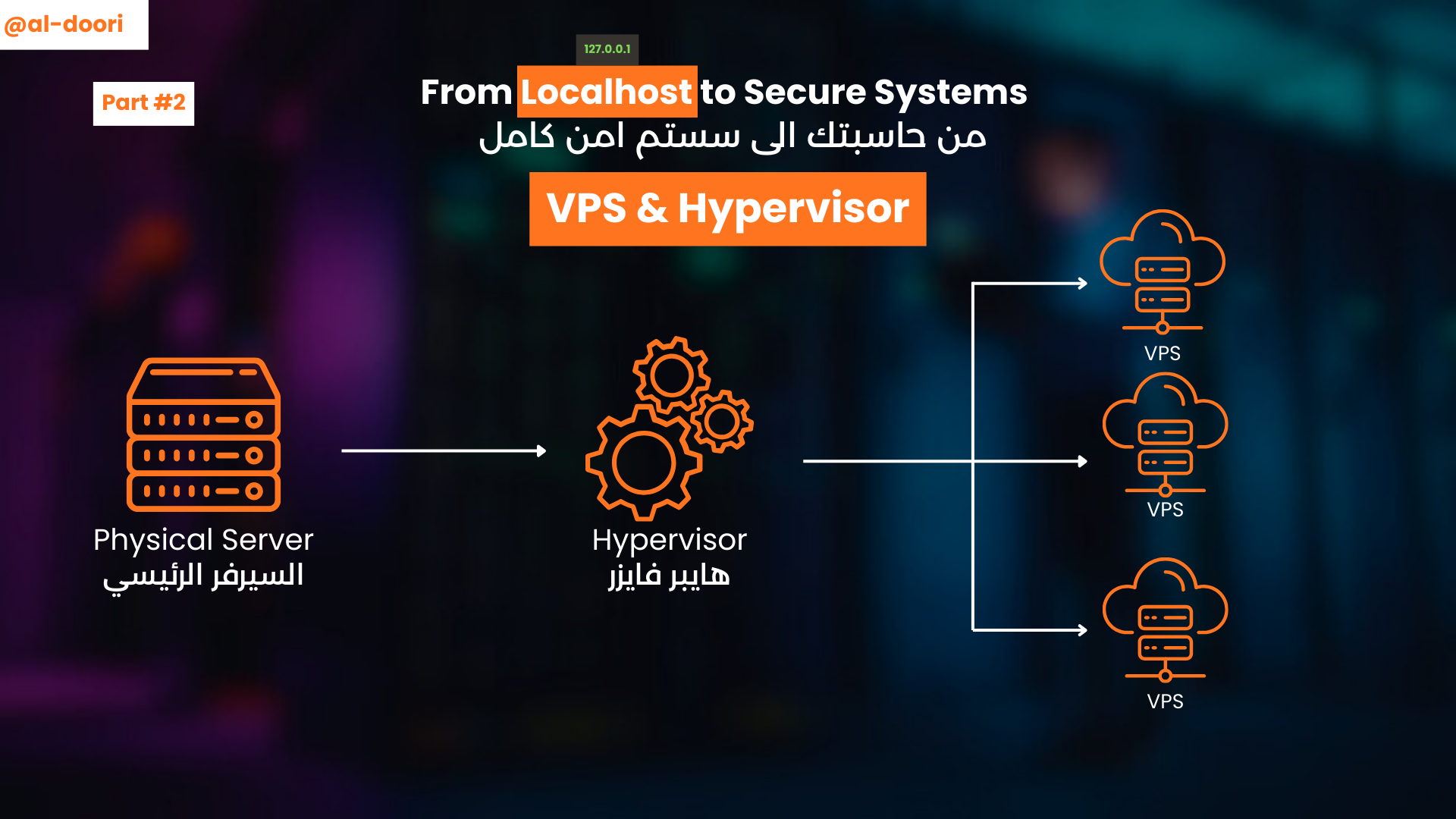
Everything starts with a physical server in a data center. (I want you always to imagine the physical server as your PC but very powerful)
This machine has:
- Powerful CPUs (many cores)
- Large amounts of RAM
- Fast SSD / NVMe storage
- HIgh-speed network interfaces.
On its own, this server could run one operating system — but that would waste most of its power.
And this is where virtualization comes in.
2. The Hypervisor (The Brain)
A hypervisor is a special layer of software installed directly on the physical server.
Popular hypervisor
- KVM
- VMware ESXI
- Hyper-V
- Xen
It is job to:
- Split the physical server into multiple virtual machines
- Allocate CPU, RAM, and storage to each one
- Enforce isolation between them.
We think of it as a traffic controller
3. Virtual Machines (Your VPS)
Each VPS is a virtual machine (VM) created by the hypervisor.
Every VPS has:
- Its own virtual CPU cores
- Its own RAM allocation
- Its own disk
- Its own network interface
- Its own operating system
From inside the VPS:
- You see only your resources
- You have root access
- You can’t see other VPS instances
That isolation is enforced at the hypervisor level
4. Resource isolation (Why Neighbors Don’t Affect You)
The main difference between VPS and shared hosting is resource isolation
The hypervisor ensures
- CPU limits are enforced
- RAM is reserved for the VPS
- Disk I/O is controlled
- One VPS crashing does not crash others
This is why VPS performance is:
- More stable
- More predictable
- More suitable for applications
5. Networking (How Traffic Reaches Your VPS)
Each VPS gets a virtual network interface
Behind the scenes:
- Traffic reaches the data center
- It hits the physical server
- The hypervisor routes it to the correct VPS
- Your OS receives it on a specific port (e.g. 80, 443, 22)
YOU → Data center → Physical server → Hypervisor → VPS → OS map it to the correct port
To you, it feels like:
“I have my own server with my own IP.”
And functionally — you do.
6. Storage (Virtual but Real)
VPS storage is usually:
- A virtual disk backed by real SSD/NVMe drivers
- Sometimes replicated for redundancy
From your VPS
/dev/sdalooks like a real disk- File systems behave normally
- Performance depends on the provider’s infrastructure
This abstraction allows:
- Easy backups
- Snapshots
- Scaling storage up or down
7. Why This Matters to Developers
For developers or software engineers or any tech guy basically 😁, understanding how VPS works help us/u:
- Debug performance issues.
- Choose correct VPS specs
- Secure your server properly
- Transition to Docker, Kubernetes, and cloud platforms
If you know how VPS works, cloud concepts stop being “Magic” and you will know how things are connected and works.
Final Thoughts
A VPS is not just a server in the cloud !
It is:
- Real hardware
- Smart virtualization
- Strong isolation
- Full operating system
When we deploy on a VPS, we are stepping into real world of infrastructure - the same foundation used by modern cloud systems.